Examples
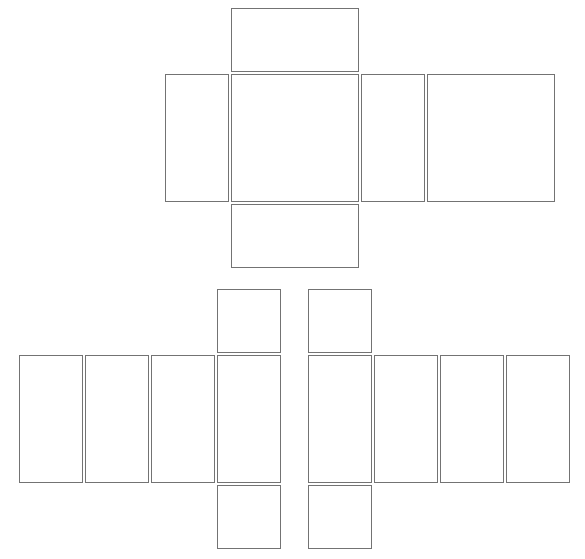
A blank Roblox clothing template for classic outfits
This Roblox clothing template is a blank canvas for classic shirts and pants. It is one 585x559 PNG with every body region marked, so you can paint a design in the image editor you already use.
Pick Shirt or Pants, then Standard or Transparent, and download. The page draws the file in your browser from the face sizes Roblox requires. It is our own drawing, not the file from Roblox, and it has no Roblox logo.
Nothing is uploaded, and there is no account, watermark or limit.
Made for
- First-time shirt makers
- Pants designers
- Artists in layered editors
- Group and team outfits
- Players matching sets
Roblox clothing template sizes for every face
Shirts and pants share one layout. Positions are from the top left corner of the 585x559 canvas.
| Region | Face | Position | Size (px) |
|---|---|---|---|
| Torso front | FRONT | x 231, y 74 | 128 x 128 |
| Torso back | BACK | x 427, y 74 | 128 x 128 |
| Torso right side | R | x 165, y 74 | 64 x 128 |
| Torso left side | L | x 361, y 74 | 64 x 128 |
| Torso top | UP | x 231, y 8 | 128 x 64 |
| Torso bottom | DOWN | x 231, y 204 | 128 x 64 |
| Right arm or leg, top | U | x 217, y 289 | 64 x 64 |
| Right arm or leg, four sides | L, B, R, F | y 355, x 19 / 85 / 151 / 217 | 64 x 128 each |
| Right arm or leg, bottom | D | x 217, y 485 | 64 x 64 |
| Left arm or leg, top | U | x 308, y 289 | 64 x 64 |
| Left arm or leg, four sides | F, L, B, R | y 355, x 308 / 374 / 440 / 506 | 64 x 128 each |
| Left arm or leg, bottom | D | x 308, y 485 | 64 x 64 |
- The Standard version also draws the R15 dashed limit lines: 96 px below the top of each torso face and 52 px below the top of each arm or leg face, the height limit for gloves and lower-leg details.
- A Roblox T-shirt is one square image, so it needs no template. The Roblox shirt maker on this site makes a 512x512 one.
How to use the Roblox shirt template
- 1
Choose shirt or pants
Set Clothing type to Shirt or Pants. The layout is the same, but the label on the arms changes to legs and each choice downloads as its own file.
- 2
Pick Standard or Transparent
Standard has grey labeled faces and the dashed limit lines, so you see where each part lands. Transparent keeps only 1 px outlines, so you can place it over finished artwork.
- 3
Download and paint
Press Download Roblox Template and open the PNG in a layered editor. Keep the canvas at 585x559 and draw each face inside its box, matching colors where two faces meet.
- 4
Hide the guides and export
Switch off the template layer, save the artwork as a PNG at the same size, then upload it through Roblox. Roblox sets its own fees and rules.